
Yacht maintenance software
Know what’s due. Keep a record of the work.
Give each system a maintenance plan and a service history you can find again. Vessel Keeper shows upcoming work alongside overdue plans and equipment that needs a fresh reading.
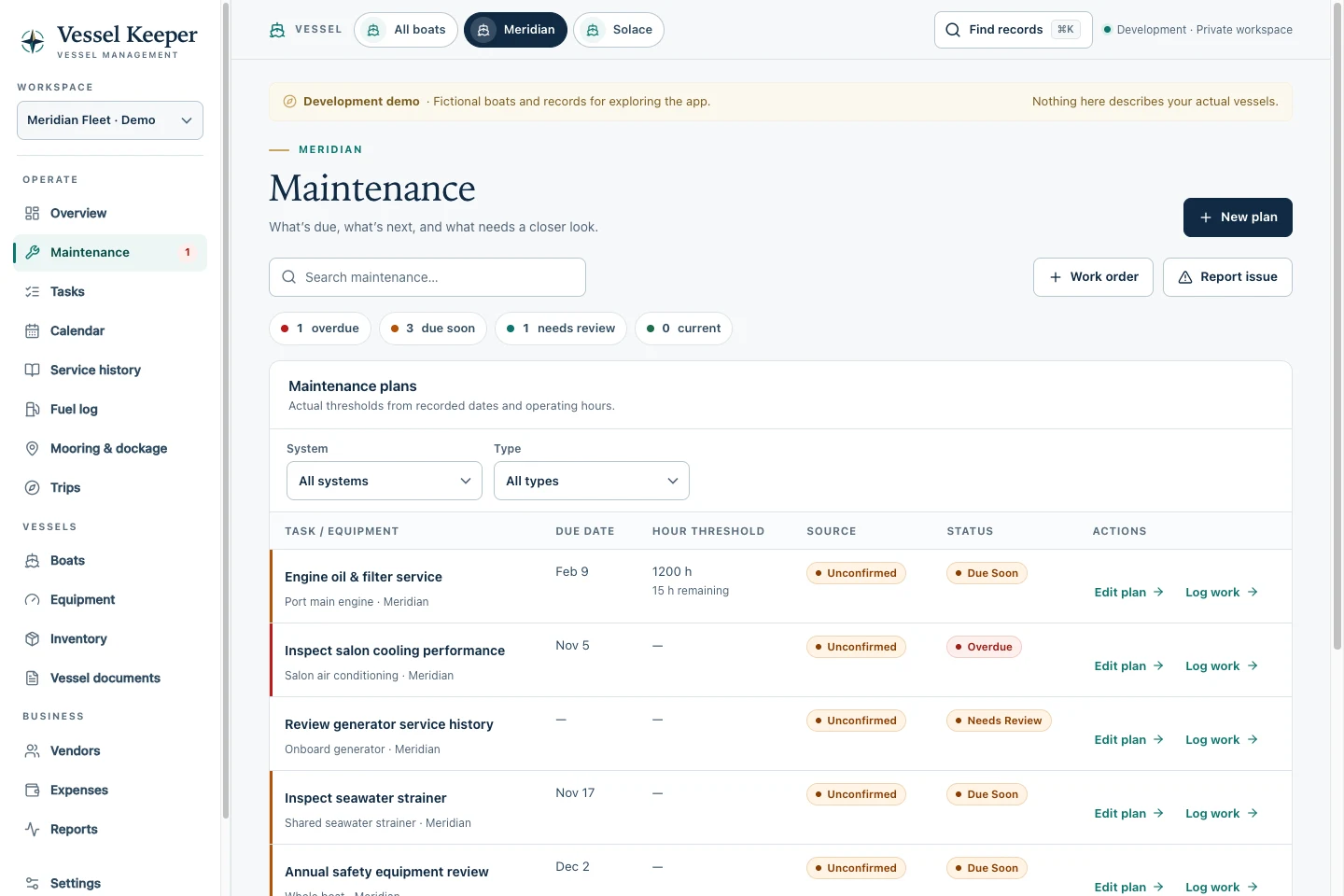
Maintenance
What it covers.
-
Plan by calendar, operating hours, or whichever comes first
Record the interval for each item and link the plan to a vessel or a piece of equipment. Filter by system, type, and status to focus on the work you’re planning.
-
Give each engine and generator its own meter history
Save dated readings for each unit. When a reading is missing or stale, Vessel Keeper flags it for review so you can collect the information you need to assess the plan.
-
Record the service while the details are fresh
Log the date, equipment, provider, and work performed. Attach the invoice or a photo, then select which maintenance plans that service fulfilled. The service stays in the vessel’s history.
Example workflow
Example workflow · Service two engines
The port engine and starboard engine may run different hours. Keep their schedules separate and still record the yard visit together.
- Set each engine’s interval using its service documentation and record its current hours.
- Use Maintenance to review each engine’s status before booking the work.
- Log the visit, record the hours for each engine, and complete the plans covered by the service.